
OpenVPN XOR Tunnel
OpenVPN XOR Tunnel is a connector for connecting On-Premises networks and servers to the MaxProtocol gateway via a secure VPN with XOR traffic obfuscation.
Creating a Tunnel
Step 1 — Select a Connector
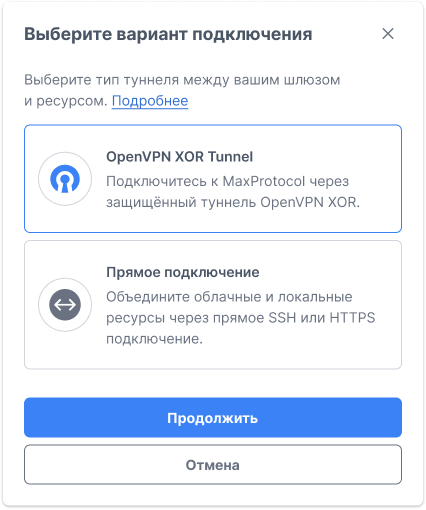
In the gateway context menu ⋯, select Add Tunnel. In the Select Connection Type form, choose OpenVPN XOR Tunnel and click Continue.
Step 2 — Fill in the Form
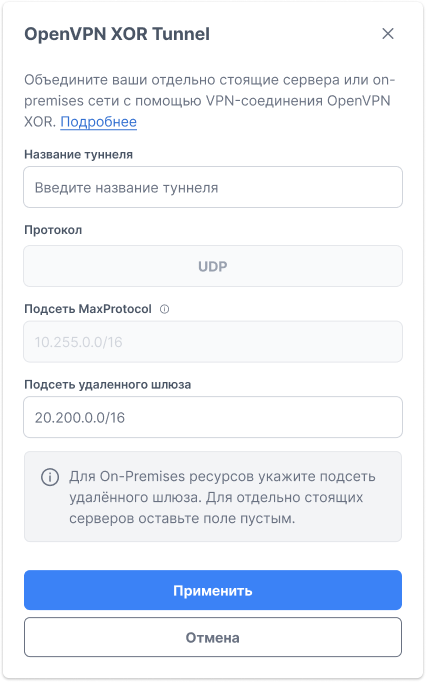
| Field | Description |
|---|---|
| Tunnel name | Name for identification in the interface (e.g., Gitlab, Office Warsaw) |
| Protocol | Transport protocol — UDP (fixed) |
| MaxProtocol subnet | MaxProtocol network IP range — filled automatically (e.g., 10.255.0.0/16) |
| Remote gateway subnet | IP range of the network on the remote server side (e.g., 20.200.0.0/16) |
WARNING
Remote gateway subnet is required for On-Premises networks. Enter the CIDR range of the remote gateway's local network. For a standalone server, leave this field empty.
Requirements for the value:
- CIDR format, e.g.
20.200.0.0/16; any other format returns an "Invalid subnet format" error; - the subnet must not overlap the MaxProtocol subnet. The check compares the first two octets: if the network subnet is
10.255.0.0/16, any value starting with10.255.is rejected with "The remote gateway subnet must not match the MaxProtocol subnet".
Click Apply to save. The tunnel will enter Setup status.
Downloading the Configuration
After creation, the tunnel must be configured on the remote server side — download the configuration file or compose project. Detailed instructions: Downloading the Configuration.
Managing the Tunnel
The tunnel context menu ⋯ provides the following actions:
- Manage — go to tunnel settings
- Download Configuration — download the configuration file or compose project
- Delete Tunnel — delete the tunnel
Tunnel Statuses
| Status | Description |
|---|---|
| Setup | Tunnel is being created, or parameter changes are being applied to it |
| Active | Tunnel is created and ready for further configuration on the remote server side |
| Deletion | Tunnel is being deleted |
NOTE
Creation and reconfiguration are two different states on the server side, but the interface labels both Setup — the tag does not let you tell them apart.