
OpenVPN XOR Tunnel
OpenVPN XOR Tunnel is a connector for connecting On-Premises networks and servers to the MaxProtocol gateway via a secure VPN with XOR traffic obfuscation.
Creating a Tunnel
Step 1 — Select a Connector
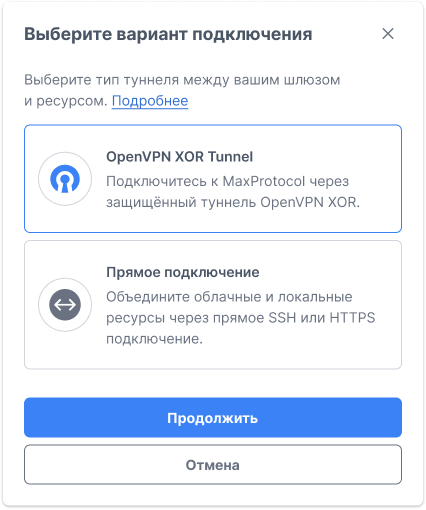
In the gateway context menu ⋯, select Add Tunnel. In the Select Connection Type form, choose OpenVPN XOR Tunnel and click Continue.
Step 2 — Fill in the Form
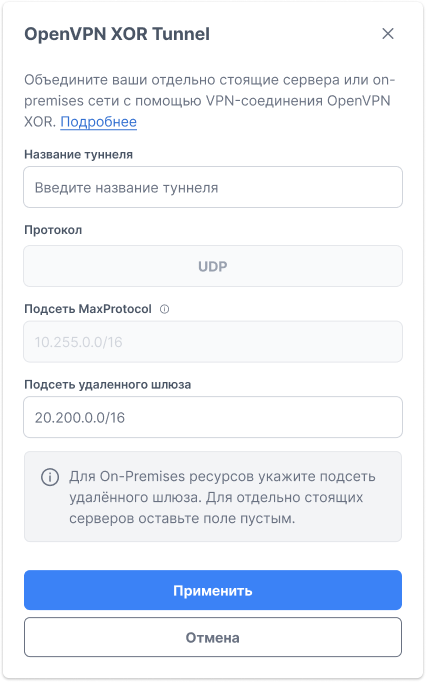
| Field | Description |
|---|---|
| Tunnel name | Name for identification in the interface (e.g., Gitlab, Office Moscow) |
| Protocol | Transport protocol — UDP (fixed) |
| MaxProtocol subnet | MaxProtocol network IP range — filled automatically (e.g., 10.255.0.0/16) |
| Remote gateway subnet | IP range of the network on the remote server side (e.g., 20.200.0.0/16) |
WARNING
Remote gateway subnet is required for On-Premises networks. Enter the CIDR range of the remote gateway's local network. For a standalone server, leave this field empty.
Click Apply to save. The tunnel will enter Configuring status.
Downloading the Configuration
After creation, the tunnel must be configured on the remote server side. In the tunnel context menu ⋯, select Download Configuration.
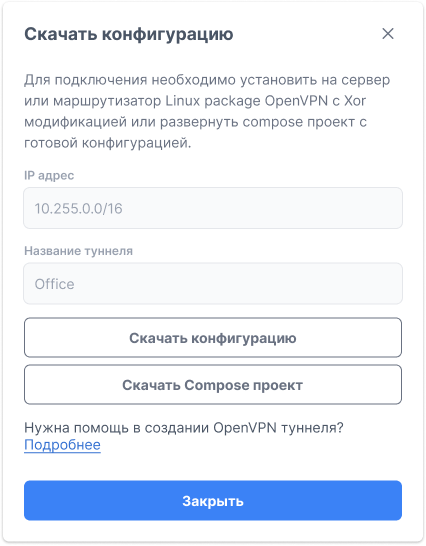
The form offers two options:
Download Configuration
A configuration file for manual installation. Server requirements:
- Installed OpenVPN with XOR modification (
tunnelblickpatch) - Linux-compatible operating system
Download Compose Project
A ready-made docker-compose project with pre-installed OpenVPN XOR. Suitable for deployment without manual package building.
# Install OpenVPN with XOR patch and run with the configuration
openvpn --config /path/to/downloaded.conf# Extract the downloaded archive and run
docker compose up -dManaging the Tunnel
The tunnel context menu ⋯ provides the following actions:
- Manage — go to tunnel settings
- Download Configuration — download the configuration file or compose project
- Delete Tunnel — delete the tunnel
Tunnel Statuses
| Status | Description |
|---|---|
| Configuring | Tunnel is being created |
| Active | Tunnel is created and ready for further configuration on the remote server side |